Online Help Documentation
Install Standard Edition
Step-1: Installing Work Examiner Console application (with built in WE Server)
- Run ‘WE_Standard.exe’ from the installation package (http://www.workexaminer.com/download/WE_Standard.zip) and follow the instructions of installer
Note: by default Spy features are disabled during the installation. You may choose to enable them on the Select Components step:
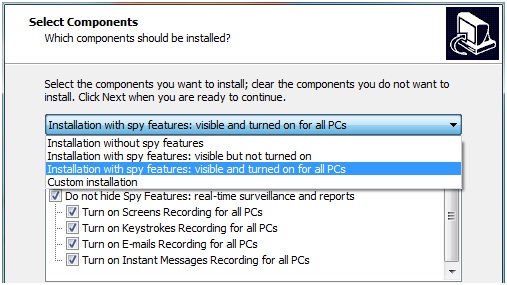
Spy features can be enabled to be visible with recording turned off - to prevent all PCs tracking. You may enable recordings later in Client Options.
- Along with installing WE Console, WE Server will also be installed and taskbar icon WE Server Manager appears
- Now you can install WE clients remotely, manage system settings, etc

Start to monitor employees instantly!
Install our solutions all over your network within 5 minutes